
Snap your receipts with your phone to sync directly with your favourite accounting software.
You take the photo. The AI does the typing. You glance at it and it's filed. The whole thing takes less time than finding a pen.
Photograph the receipt at the counter, in the ute, wherever. Or upload a photo or PDF from your computer, or forward the email it came in to your own Filed address.
The AI reads the supplier, date, total, GST and ABN in a few seconds and picks a category. The picture sits next to the fields. If it looks right, one tap.
It lands in a searchable archive you keep for the tax office, and goes straight into Xero with the picture attached.
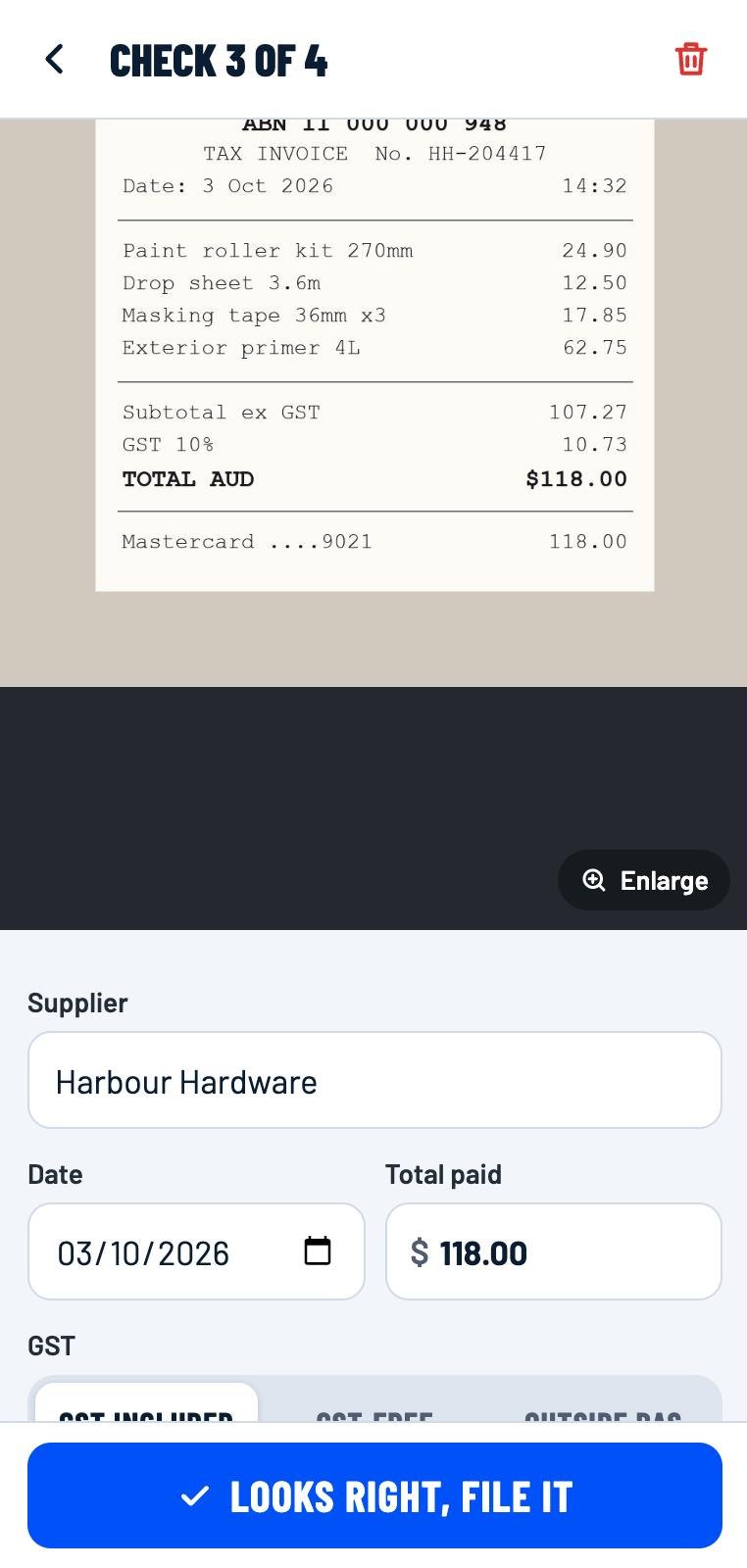
Every receipt is read, checked and coded before you see it. The questions that usually land in your inbox at BAS time are answered on the spot.
Most receipt tools are sold to bookkeeping firms. Filed is for the person who actually has the receipt in their hand.
Supplier, date, total, GST, ABN, payment type and what you bought, in a few seconds. Faded thermal paper, PDFs and invoices included.
Reads the GST that's printed, flags when it isn't, checks the ABN's real, and tells you when a claim over $82.50 needs a tax invoice.
Code Bunnings as Materials once and every Bunnings receipt after that comes pre-filled. The pile gets quicker every week.
Every receipt picture kept, with its details, until you delete it. Search by supplier, amount or category. The tax office wants five years; you've got them.
A month, a BAS quarter or a financial year as a CSV for Excel, Google Sheets or your accountant. Works with any accounting software on earth.
Filed receipts land in Xero as Spend Money, or in QuickBooks as an Expense, with the picture attached, coded to the right account, GST split exactly. MYOB is coming soon.
Prices in Australian dollars, plus GST, billed monthly by card. No contract: cancel any time and you've spent nine dollars.
No contracts. Cancel any time. Your receipts stay exportable whatever happens.
Dext is built for bookkeeping practices and priced like one. Receiptor AI only really works when the receipt arrived by email. If you're the one holding the paper, you need the AI to do the reading, the GST and the checking, and that's what Filed is built around.
| Filed | Dext | Receiptor AI | |
|---|---|---|---|
| Who it's built for | Business owners and sole traders | Accountants and bookkeepers first | Businesses whose receipts arrive by email |
| Starting price | A$9 + GST a month, unlimited receipts | About US$31.50 a month | US$29 a month (about A$44) |
| Receipt limit | Unlimited | 250 documents a month on the entry plan, then extraction pauses | 50 documents a month, then 4 US cents each |
| Getting started | Sign up on your phone, snap a receipt | Usually set up through your accountant | Connect your email inbox |
| Paper receipts: fuel, hardware, parking, cafes | Snap it with your phone, read in about three seconds | Photo via the Dext app | No camera app. Send a photo by WhatsApp or iMessage |
| Receipts that arrive by email | Forward them to your own Filed address | Yes | Yes, it reads your inbox |
| AI reads supplier, date, total, GST, ABN and invoice number | Yes, shown beside the picture for a one-tap check | Reads supplier, date and total | Reads supplier, date and total |
| AI picks the category and remembers how you coded each supplier | Yes | Not listed | Asks you when it isn't sure |
| GST read off the receipt, never invented. 1/11 helper when it isn't printed | Yes | Not listed | Not listed |
| Checks the ABN and the $82.50 tax-invoice rule | Yes | Not listed | Not listed |
| Warns about double-ups, missing dates, future dates and foreign currency before filing | Yes | Not listed | Checks Xero for duplicates |
| Xero, QuickBooks, MYOB | Xero and QuickBooks today, with the picture attached. MYOB coming soon | Yes | Xero and QuickBooks |
| Cost receipts to a client job | Yes on Business: pick the job when you check, see spend per job, tagged in Xero and QuickBooks | Projects on higher plans | Not listed |
| Export to a spreadsheet | Yes, by month, BAS quarter, financial year or job | Yes | Yes |
| Made for Australia | Built in Sydney. GST, ABN and BAS logic built in. Prices in AUD | UK company, Australian edition | Offshore company, prices in US dollars |
Dext details are from its published pricing and feature pages, August 2026. Receiptor AI details are from its website, pricing page and Xero App Store listing, October 2026. Both change from time to time. "Not listed" means we couldn't find it on their public pages, not that they can't do it.
On a server in Australia. Pictures and details are encrypted on the way in and out, and only your account can see them. Nothing is sold or shared with anyone.
No. To read a receipt the picture goes to OpenAI's service, and under the terms of that service your pictures aren't used to train its models. We ask you to agree to this before the first receipt is sent. See the privacy policy.
Xero and QuickBooks Online. Connect yours from the account menu and every receipt you file is posted straight in, coded to the right account, with the picture attached. MYOB Business is coming soon. Until then, or on anything else, export the spreadsheet: a CSV by month, BAS quarter or financial year with the supplier, ABN, category, GST and a link to every receipt picture, ready for your bookkeeper to enter or match in MYOB or any other software.
Until you delete them. The ATO wants records kept for five years, so there's no cap on storing. Delete your account and everything goes with it, straight away.
You always see the picture next to the fields and you can change anything before filing. Anything the AI isn't sure about is left blank and flagged rather than guessed, because a blank gets checked and a wrong number gets filed.
No. If you're not registered, set your categories to GST-free and the GST column stays empty. If you are, Filed reads the GST that's printed and tells you when a claim needs a tax invoice.
Yes, on the Business plan. Set up a job for each site or client, pick it when you check a receipt, and the Jobs screen shows what you've spent on each, GST and all. Same supplier on three jobs is exactly the case it's built for: the docket doesn't say which site, so you do, with one tap. The job goes to Xero as a tracking category and to QuickBooks as the customer, so their job reports work too. Already set up jobs in Xero? Bring them in with one press.
No. Solo is A$9 a month plus GST with no contract, so trying it costs nine dollars and you can cancel in a couple of taps from Manage billing. Your receipts stay exportable whatever you decide.
Filed works in your phone's browser today, camera and all: add it to your home screen and it behaves like an app. Store apps for iPhone and Android are on the way.
Yes, on the Business plan. Add each business (the trading company, the family trust, the property company) and pick the right one on every receipt; Filed remembers where each supplier went last time. One business goes straight into your Xero or QuickBooks. The others are exported for their bookkeeper, as a spreadsheet or as a file that imports into their own Xero as draft bills.
Today, give them the spreadsheet export, or connect Xero and they'll see every receipt with its picture attached. Shared logins for your team and your bookkeeper are on the way and will land on the Business plan first.
Sign up on your phone, snap the next thing you buy, and watch it file itself.
Get started Filed